I received a call from a client recently. They renewed the SSL certificate on their NetScaler, and while their iOS Receiver users could still authenticate and enumerate applications, they could no longer launch applications and desktops. All intermediate certificates were properly installed and linked.
The issue turned out to be the encryption method - SHA2 - used to hash the digital signature.
While SHA2 certificates have been around for a while, SHA1 certs had been the standard – until now. Microsoft has announced a new policy for CAs (Certification Authorities) who are members of the Windows Root Certificate Program (who issue publicly trusted certificates). The policy dictates that SHA1 certificates will be deprecated on January 1, 2016. After that date, only SHA2 certificates will be allowed to be issued. Unfortunately, the latest iOS (5.8) and Android (3.4) Citrix Receivers (among others) do not support SHA2 certificates when proxied through the NetScaler. See the full Receiver product matrix.
While Citrix has promised a NetScaler upgrade in 2004 Q2 to remedy the issue, if you are supporting remote iOS or Android users through NetScaler and you need to upgrade your SSL certificate, make sure that you purchase a SHA1 cert and not a SHA2 cert.
Note: I do find it curious, however, that Microsoft is still using a SHA1 certificate on their own site. ;-)
Wednesday, May 21, 2014
Friday, May 16, 2014
Synergy 2014 - Migrating Web Interface Customizations to StoreFront
Didn’t make it to Citrix Synergy this year? Not to worry!
While this year’s session was not videotaped for SynergyTV, you can still download all presentation materials and source code:
o Demo 1 – The Power of jQuery
o Demo 2 – New StoreFront Skin
o Demo 3 – Adding Help Desk information
o Demo 4 – Alternate Application Views
o Demo 5 – StoreFront Store Customization SDK
You can also view the presentation on SlideShare!
If you have any questions on the above, you can reach me at Sam.Jacobs@ipm.com
Wednesday, April 9, 2014
Citrix NetScaler and the Heartbleed Bug
If you haven’t heard about the 2 year old OpenSSL security flaw named Heartbleed, check out the official site for information : Heartbleed.com. Sadly, it was just ‘discovered’ a couple days ago.
In a nutshell, it is a vulnerability in some versions of OpenSSL that allows hackers and script kiddies to steal protected information through normal interactions without detection. It has to do with the heartbeat/handshake process that happens between the server and the client. The easiest high level explanation I have read is that during the handshaking process, a client normally send 64kb of information to the server that the server then in turn echoes back to the client. To exploit the vulnerability, a malicious client can send an abnormal 1kb package instead during the handshaking process and then the server will echo that 1k back but fill the rest with server memory (63kb) to make a complete package. This server memory can contain other user sessions data including usernames, passwords, encryption keys and other privileged information. Fortunately, it is a simple coding mistake that can be easily rectified through a patch. Unfortunately, it has been out there for around 2 years and is/was affecting a large part of the internet.
I opened up a case with Citrix to find out if the Citrix NetScalers that handle SSL VPNs are affected by this bug and was pleased to find out that they are not. The Netscalers use an older version of OpenSSL that is not vulnerable to this type of attack. The Netscalers use OpenSSL 0.9.7 and affected versions are 1.0.1 and 1.0.2 versions.
The Netscalers do not support the ‘TLS heartbeat’ extension in the SSL engine that is affected by the Heartbleed Bug.
You can also use the following site to check other web sites for the vulnerability here:
http://filippo.io/Heartbleed/
My colleague Carlo Costanzo (http://www.vmwareinfo.com/) tested some View Servers and some older versions of CSG using the tester above and they also came back clean.
Update: Citrix has an official link here: http://support.citrix.com/article/CTX140605
In a nutshell, it is a vulnerability in some versions of OpenSSL that allows hackers and script kiddies to steal protected information through normal interactions without detection. It has to do with the heartbeat/handshake process that happens between the server and the client. The easiest high level explanation I have read is that during the handshaking process, a client normally send 64kb of information to the server that the server then in turn echoes back to the client. To exploit the vulnerability, a malicious client can send an abnormal 1kb package instead during the handshaking process and then the server will echo that 1k back but fill the rest with server memory (63kb) to make a complete package. This server memory can contain other user sessions data including usernames, passwords, encryption keys and other privileged information. Fortunately, it is a simple coding mistake that can be easily rectified through a patch. Unfortunately, it has been out there for around 2 years and is/was affecting a large part of the internet.
I opened up a case with Citrix to find out if the Citrix NetScalers that handle SSL VPNs are affected by this bug and was pleased to find out that they are not. The Netscalers use an older version of OpenSSL that is not vulnerable to this type of attack. The Netscalers use OpenSSL 0.9.7 and affected versions are 1.0.1 and 1.0.2 versions.
You can check the open ssl version on the Netscaler by following the below steps:
Login to the netscaler using putty.
Go to the shell prompt.
type the command: openssl, press enter.
type the command: version -a, press enter.
This will give detail info about the OpenSSLl version on the Netscaler.
The Netscalers do not support the ‘TLS heartbeat’ extension in the SSL engine that is affected by the Heartbleed Bug.
You can also use the following site to check other web sites for the vulnerability here:
http://filippo.io/Heartbleed/
My colleague Carlo Costanzo (http://www.vmwareinfo.com/) tested some View Servers and some older versions of CSG using the tester above and they also came back clean.
Update: Citrix has an official link here: http://support.citrix.com/article/CTX140605
Thursday, November 14, 2013
TechDev Tip - Email enabled ShareFile Folders
A client asked if ShareFile supported email-enabled folders.
They frequently exchange large documents with their clients, and wanted to know whether they could associate an email address to a ShareFile folder (e.g. clientNameDocs@ipmit.shareFile.com), and have any attachments sent to that email address get automatically uploaded to the associated folder.
Jay Tomlin (@jtmln) is now the PM of ShareFile, and informed me that ShareFile DOES, in fact, support email-enabled folders.
Full details are in this KB article but in a nutshell:
You do this by using the "Request a file" option in the folder details:
That process will generate an upload URL which will look like this:
https://Acme.sharefile.com/r/rebe49f54d59a
Take the tail end of that URL and use it as an email address with @mail.sharefile.com, e.g.: rebe49f54d59a@mail.sharefile.com
You might want to set up an alias that uses the client’s name, so that the email address is not so cryptic.
Monday, April 30, 2012
How to Automatically Close or Logoff from Web Interface After Launching an Application
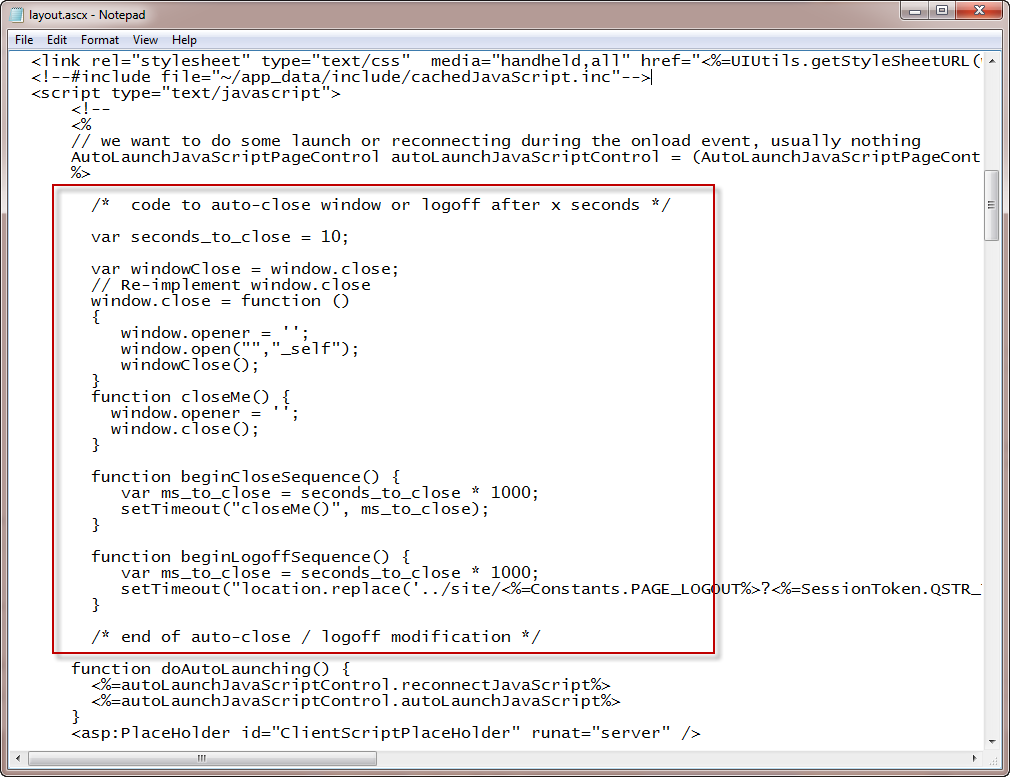
You may wish, for security reasons or otherwise, to automatically terminate a user’s session once an application has been launched. With the modifications below, you have the option of either automatically logging out of Web Interface, or automatically closing the browser window (or tab). The way it is coded, it’s set to logout or close after 10 seconds, but that value is configurable.
Part 1
Back up the file ..\app_data\include\layout.ascx and open with Notepad.
Copy and paste the contents of the attached text file:
AutoCloseWindowCode Code Modifications right before the function doAutoLaunching()
(should be approx. line #68).
Part 2
The next modification will depend on whether you are explicitly launching the application (by clicking it), or you are auto-launching a desktop.
For explicitly launched applications:
Back up the file \app_code\PagesJava\com\citrix\wi\pageutils\include.java
IMPORTANT – You cannot keep your backup in the same directory, or the Java compiler will be very unhappy with you.
Open with Notepad, and at line #1194, you should see:
result = result + " onClick=\"resetSessionTimeout();clearFeedback();";
If you want to logout after 10 seconds, change that to:
result = result + " onClick=\"beginLogoffSequence();clearFeedback();";
If you want to close the browser window, change that to:
result = result + " onClick=\"beginCloseSequence();clearFeedback();";
Warning! Javascript is case-sensitive!
Save the file. An IISRESET is not required.
For auto-launched desktops:
Back up the file ..\site\directLaunch.aspx and open with Notepad.
Scroll to the bottom of the file … To automatically close the browser window or tab, enter:
<script type="text/javascript" >
beginCloseSequence();
</script>
To automatically logoff the user from Web Interface, enter:
<script type="text/javascript" >
beginLogoffSequence();
</script>
Subscribe to:
Posts (Atom)