You may wish, for security reasons or otherwise, to automatically terminate a user’s session once an application has been launched. With the modifications below, you have the option of either automatically logging out of Web Interface, or automatically closing the browser window (or tab). The way it is coded, it’s set to logout or close after 10 seconds, but that value is configurable.
Part 1
Back up the file ..\app_data\include\layout.ascx and open with Notepad.
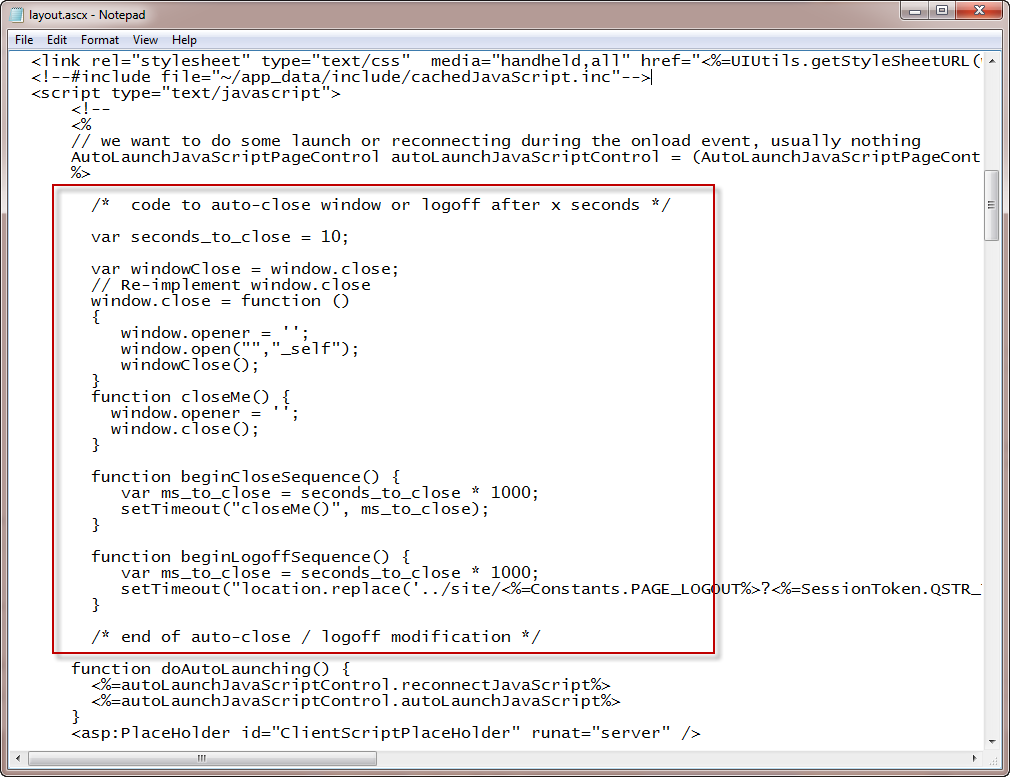
Copy and paste the contents of the attached text file:
(should be approx. line #68).
Save the file. It should look somewhat like:
Part 2
The next modification will depend on whether you are explicitly launching the application (by clicking it), or you are auto-launching a desktop.
For explicitly launched applications:
Back up the file \app_code\PagesJava\com\citrix\wi\pageutils\include.java
IMPORTANT – You cannot keep your backup in the same directory, or the Java compiler will be very unhappy with you.
Open with Notepad, and at line #1194, you should see:
result = result + " onClick=\"resetSessionTimeout();clearFeedback();";
If you want to logout after 10 seconds, change that to:
result = result + " onClick=\"beginLogoffSequence();clearFeedback();";
If you want to close the browser window, change that to:
result = result + " onClick=\"beginCloseSequence();clearFeedback();";
Warning! Javascript is case-sensitive!
Save the file. An IISRESET is not required.
For auto-launched desktops:
Back up the file ..\site\directLaunch.aspx and open with Notepad.
Scroll to the bottom of the file … To automatically close the browser window or tab, enter:
<script type="text/javascript" >
beginCloseSequence();
</script>
To automatically logoff the user from Web Interface, enter:
<script type="text/javascript" >
beginLogoffSequence();
</script>

 ·
·